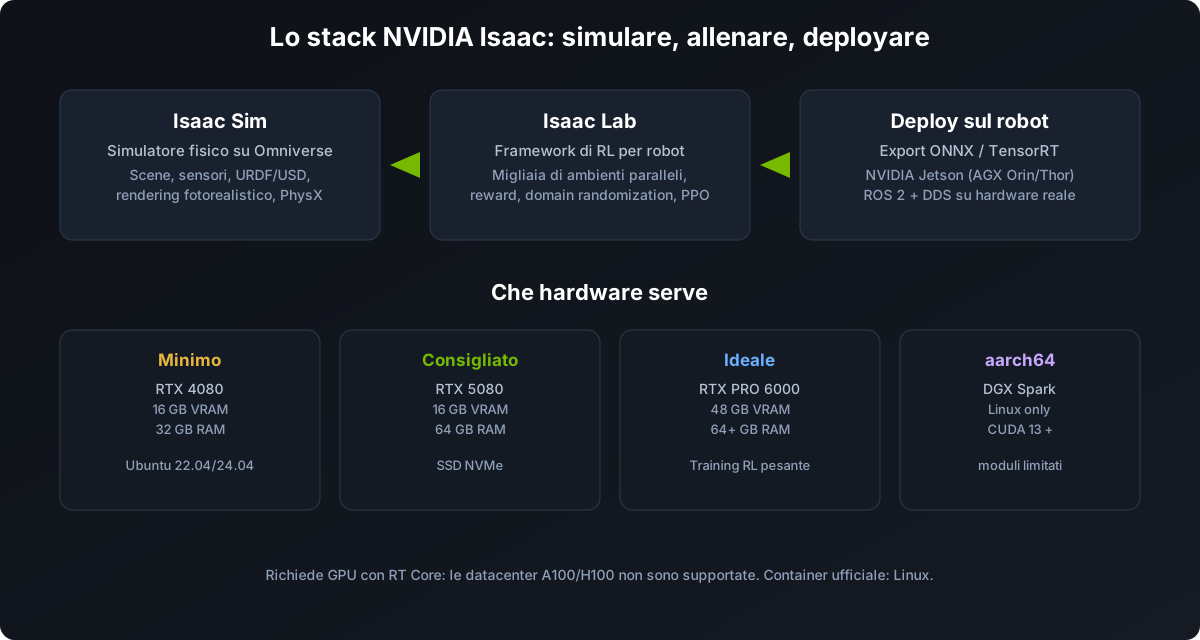
NVIDIA Isaac is the reference platform for simulating, training and validating robots before deployment on real hardware. It is not a single product: it is a stack made of Isaac Sim (the simulator), Isaac Lab (the reinforcement learning framework) and Omniverse (the real-time 3D collaboration base). In this complete CALIGO guide we cover how to use it, what hardware you need, how much it costs to run, and the alternatives for hosting and training.
What Isaac Sim, Isaac Lab and Omniverse are
People often confuse the three names. In practice they are three layers of the same ecosystem:
- Omniverse — the real-time 3D collaboration platform based on OpenUSD. Since 2025 NVIDIA simplified the packaging: most robotics workflows use Isaac Sim directly without the Omniverse Launcher.
- Isaac Sim — the physical robot simulator: imports URDF/USD models, simulates sensors (camera, LiDAR, IMU), physics with PhysX and photorealistic rendering. It supports ROS 2 natively.
- Isaac Lab — the robot training framework built on Isaac Sim: defines environments, observations, actions, rewards and launches training with standard RL libraries (RSL-RL, RL-Games, SB3). It is the successor of Isaac Gym.
The flow is: build the scene in Sim, train the policy in Lab, export it and deploy it on the real robot.
How to use it: the sim-to-real flow
- Import the robot — URDF (from CAD or ROS) converted to USD, or ready assets (Franka, UR, ANYmal, Unitree G1…).
- Configure the scene — ground plane, lights, sensors, task and initial pose.
- Define the environment in Isaac Lab — observation space, action space, reward function.
- Train the policy — RL with thousands of parallel GPU environments (e.g. PPO with RSL-RL).
- Validate in simulation — replay the policy with the visualizer and measure success rate.
- Export and deploy — export to ONNX, convert to TensorRT and load on NVIDIA Jetson (AGX Orin/Thor) or on the robot via ROS 2.
Step-by-step installation
On an Ubuntu 22.04/24.04 or Windows 11 workstation (Linux is more stable for training), the recommended path is pip + Isaac Lab:
# 1. Install Isaac Sim via pip (~15 GB, 20-30 min)
pip install isaacsim==5.0.0 --extra-index-url https://pypi.nvidia.com

# 2. Clone Isaac Lab and install dependencies
git clone https://github.com/isaac-sim/IsaacLab.git
cd IsaacLab
./isaaclab.sh --install

# 3. Verify: the Omniverse viewport should open with an empty scene
./isaaclab.sh -p scripts/tutorials/00_sim/create_empty.py
For headless training (no GUI, on servers or cloud) add --headless to the commands. Example of manipulation policy training:
./isaaclab.sh -p scripts/reinforcement_learning/rsl_rl/train.py --task Isaac-Lift-Cube-Franka-v0 --num_envs 2048 --headlessMetrics to monitor during training: episode_rew_mean (must grow), success_rate (target 70%+ before export) and value_loss (if it diverges, lower the learning rate).
Hardware requirements
Requirements differ between rendering (Isaac Sim) and training (Isaac Lab): training pushes VRAM and parallelism harder. Indicative reference:
| Tier | GPU | VRAM | RAM | Notes |
|---|---|---|---|---|
| Minimum | RTX 4080 | 16 GB | 32 GB | Simple scenes, few sensors |
| Recommended | RTX 5080 | 16 GB | 64 GB | Standard Lab workflow |
| Ideal | RTX PRO 6000 | 48 GB | 64+ GB | Heavy RL training |
| aarch64 | DGX Spark | - | - | Linux only, some modules unsupported |
Requirements and practical notes
- RT Cores required: datacenter GPUs A100/H100 without RT Cores are not supported by Isaac Sim.
- Operating system: Ubuntu 22.04/24.04 or Windows 11; the official container is Linux-only. Windows 10 is not supported.
- Driver: recent production branch (e.g. 580.xx on Linux).
- Storage: 50 GB SSD minimum, 500 GB-1 TB NVMe if you work with many assets.
- Connectivity: HTTPS access to the online Omniverse assets is required.
Domain randomization: the secret of sim-to-real
The transfer from simulator to real robot never happens "clean". The standard technique is domain randomization: randomize mass, friction, damping, actuator gains, noise and action delay during training, so the policy learns to be robust.
| Parameter | Typical range | Impact |
|---|---|---|
| Object mass | 0.5x-2x nominal | High |
| Friction | 0.3-1.2 | High (contact) |
| Joint damping | 0.8x-1.5x | Medium |
| Actuator strength | 0.7x-1.3x | High (locomotion) |
| Observation noise | sigma 0.01-0.05 | Medium |
| Action delay | 0-3 steps | High |
Rule of thumb: if the policy with randomization stays below 60% success in simulation, the ranges are too wide. Pull back to 80%+, then widen gradually while monitoring real behaviour.
Best practices for reward design
The reward function is the most important engineering decision: most sim-to-real failures are reward and randomization problems, not algorithm problems. Rules that work:
- Sparse + dense rewards: start from a sparse reward that captures the objective, then add dense shaping. Always include penalties for unsafe or wasteful behaviours (energy, joint limit violations, collision impulses).
- Exponential kernels: use terms like exp(-||error||^2 / sigma^2) instead of linear errors: they saturate near zero and give a dense gradient even with large errors.
- Penalise mechanical cost: torques, action rate and angular acceleration with a small weight (1e-4 .. 1e-3) produce efficient trajectories that transfer better.
- Separate task from style: one group for success (velocity, goal reaching) and one for style (smoothness, energy, posture). The task must dominate early; style tightens at the end.
- Curriculum learning: start from simple versions (flat ground, rigid objects) and increase difficulty only when the mean reward exceeds a threshold — not on a fixed time.
Metrics to monitor and debugging
- Episode length and termination causes — understand if the policy "gives up" or times out.
- Policy entropy — if it drops too fast, premature convergence.
- Value loss and explained variance — divergence means the learning rate is too high.
- FPS and num_envs — more parallel environments = more data; beyond a threshold returns diminish.
OOM errors are common: reduce the number of environments, simplify collision meshes and use headless mode for training. NaN in observations means unstable simulation: check limits and gains, reduce the timestep or increase solver iterations.
Before deploying on hardware, run a sim-to-sim check: train in Isaac and roll out in a second simulator (MuJoCo/PyBullet). If the policy transfers, the implementation is correct. Always export the policy together with the normalizer (mean and standard deviation of the observations).
ROS 2 integration
Isaac Sim integrates natively with ROS 2 (Humble on Ubuntu 22.04, Jazzy on 24.04): you import the robot from URDF, add sensors (RGB-D camera, RTX LiDAR, IMU, contact) and connect your stack to the simulator through the ROS 2 Bridge. You can validate entire stacks — from Nav2 navigation to manipulation — before touching the hardware. The DDS middleware is configurable: FastDDS by default, CycloneDDS or Zenoh.
On deployment, Isaac ROS runs the DNN policies in inference while Isaac Sim publishes observations and receives actions: the bridge between training (Isaac Lab) and the real robot. On AGX Orin, policies up to ~10M parameters run in 5-15 ms.
Manipulation: teacher-student distillation
For contact-rich tasks (manipulation), randomization alone is not enough: contact mechanics in simulation diverge from real object compliance. The most effective pattern is teacher-student distillation: train a "teacher" with privileged observations (e.g. tactile sensors) and distill a "student" that uses only proprioception and can run on the real robot at low latency.
Alternatives for hosting and training
Not everyone has an RTX at home or wants to depend on the NVIDIA ecosystem. The alternatives split along two axes: where you run it and which framework you use.
| Option | Who | Pro | Con |
|---|---|---|---|
| RTX workstation | Local | Fast iteration, private data | Cost, no scaling |
| Hourly cloud GPU | runpod, Lambda, Vast.ai, Paperspace | Cheap for sessions | Setup, storage, latency |
| Managed cloud GPU | CoreWeave, Brev, NGC on AWS/GCP | Ready to use, scalable | Ongoing cost |
| DGX Spark | Local aarch64 | Datacenter power at home | Linux only, limited modules |
For the training framework, the most valid alternatives today:
- MuJoCo — light, extremely fast for RL, used by DeepMind; great for locomotion policies.
- Genesis — next-generation simulator with extremely fast scene generation.
- Gazebo / ROS 2 — the standard for ROS integration, less suited to massive RL.
- CoppeliaSim / PyBullet — simple for teaching and prototyping.
When to choose NVIDIA and when an alternative
- Choose NVIDIA Isaac if you need rendering, realistic sensors, massive RL training and a complete ecosystem with Jetson support.
- Choose MuJoCo/Genesis if you only do RL research (locomotion, control) and want maximum speed without high GPU cost.
- Mixed: many teams train in MuJoCo and validate in Isaac, or vice versa, before deployment.
FAQ
- Is Isaac Lab free? Yes, MIT licensed (commercial use included). Isaac Sim is free for development; for scaled training you need GPUs.
- Can I use Isaac with a Unitree robot? Yes: EDU models (G1, Go2, H2) have URDF/USD and integrate with the stack — see G1 programming / SDK.
- Is ROS 2 mandatory? No, Isaac Lab also runs standalone; ROS 2 is needed for deployment and integration with the rest of the stack.
- How long for a policy? Basic locomotion: ~20 min on an RTX 4090 with 4,096 environments. Manipulation (lift): hours on a dedicated GPU.
What hardware do you need? Calculate it
Two quick questions to know where to start.
1. Which scenario are you planning?
2. Where will you run it?
How this relates to Unitree work
Many projects on G1 and SDK2 or ROS 2 use Isaac to train locomotion before deployment. CALIGO supports you in choosing between the NVIDIA stack and open-source alternatives based on budget and goal, and in developing the policy up to deployment on the robot.
Sources and useful links
This guide synthesises official NVIDIA documentation and independent tutorials (updated to 2026). Dig deeper directly from the sources:
- NVIDIA — Isaac Sim system requirements
- Isaac Lab — installation guide
- Isaac Lab — training and debugging guide (OOM, metrics)
- GitHub — IsaacLab
- VnRobo — training locomotion with Isaac Lab step by step
- Nepher — best practices for policy training in Isaac Lab
- NVIDIA — ROS 2 Reference Architecture in Isaac Sim